


shiptoyou Payment Methods: Your Guide to Hassle-Free Global Checkout
At SHIPTOYOU Payment , we prioritize your convenience by offering diverse and secure global payment options. Whether you are paying for K-pop merchandise, K-fashion, or K-beauty products, follow this guide to ensure a seamless transaction for your Korean online shopping experience with Korean Warehouse Service SHIPTOYOU.
⚠️ Important: Use Currency Switch
Before finalizing your payment, you must select your preferred currency (EUR, JPY, KRW, or USD) using the Currency Switch located at the top of our website.

Click the currency menu at the top-right corner to ensure your total amount is displayed in the correct currency before proceeding to checkout.

Supported Payment Options
🏦 Bank Wire
Supported: EUR, JPY, KRW, USD
* Use 'Currency Switch' before checkout.
- SWIFT Transfer
- Wise Transfer
- Xoom Transfer
💳 PayPal
Supported: USD
* Switch site currency to USD before payment.
Use your credit/debit card or existing PayPal balance.
💸 Western Union
Supported: USD
* Switch site currency to USD before payment.
Secure international fund transfer via bank or card.
Bank Wire Transfer Methods
If you choose Bank Wire, you can use any of the following reliable services. Korea does not use IBAN codes.
| Method | How to Use | Key Advantages | Link |
|---|---|---|---|
| SWIFT | Use 'Overseas Remittance' in your bank app; enter bank name, SWIFT code, account number, and recipient's name. | Universal and highly trusted. | |
| Wise | Go to Wise, select 'Send Money', and complete the transfer via bank account or card. | Real-time rates, low fees. | Wise |
| Xoom | Visit Xoom, set the destination, and pay using your PayPal account or card. | Fast PayPal integration. | Xoom |
How to Complete Your Payment
- Select Currency: Use the Currency Switch to set your preferred currency (EUR, JPY, KRW, or USD).
- Verify Price: Confirm the product price matches your selected currency.
- Choose Method: Select your preferred option: Bank Wire, PayPal, or Western Union.
- Transfer: Follow the specific instructions for SWIFT, Wise, or Xoom if choosing Bank Wire.
- Confirmation: Once the transaction is processed, our team will confirm your payment.
How to Cancel an Unpaid Bank Wire Transfer Order
If you wish to change your payment method or currency before completing a bank transfer, follow these steps to cancel your pending order:
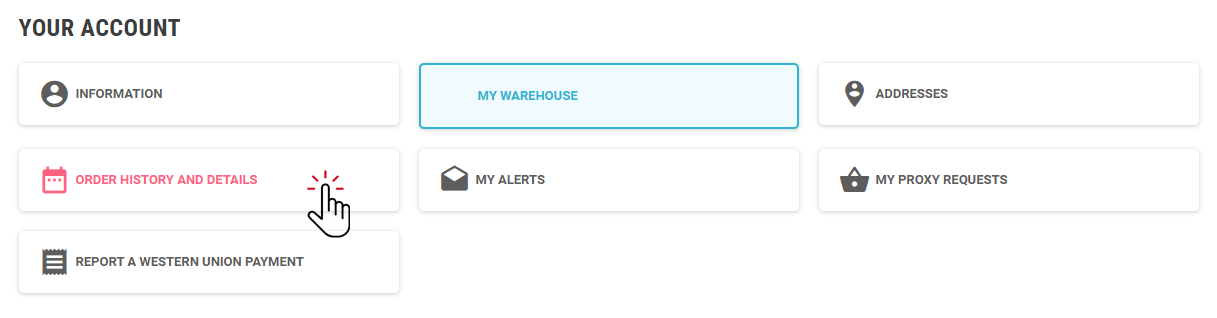
- Log into My Account and select ORDER HISTORY AND DETAILS.
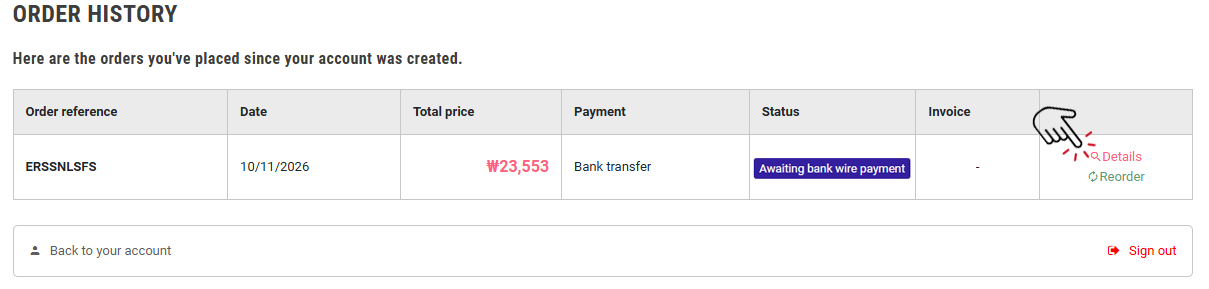
- Click Details next to the pending Bank Transfer order you wish to cancel.
- Click CANCEL ORDER under ORDER DETAILS.
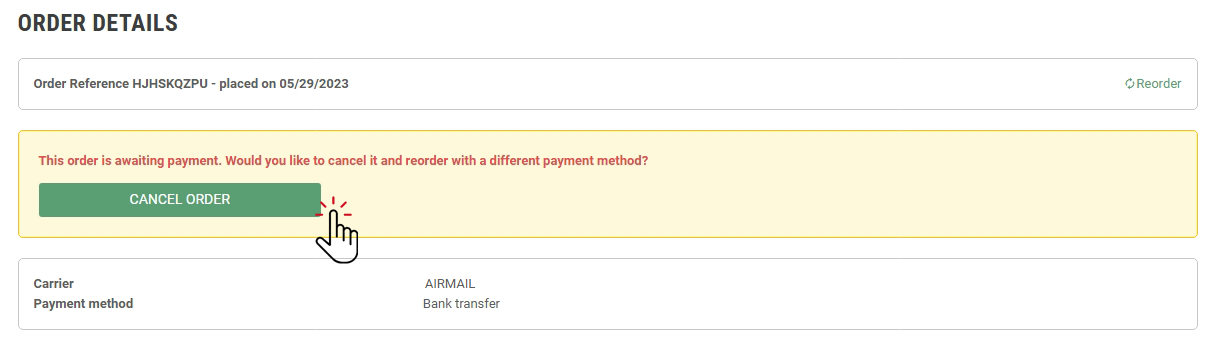
Once canceled, you can place a new order using your preferred payment method.
Note: Orders can only be canceled if the bank transfer payment has not been completed. Orders that have already been processed cannot be canceled.
Need help? Contact our support team for assistance with your payment.